このブログを検索

ラベル OSPF の投稿を表示しています。 すべての投稿を表示

2023/11/24

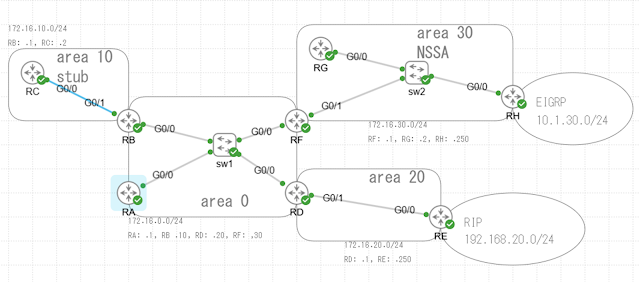
Ping-t ENARSI問題集に出てきたOSPFマルチエリア構成の確認

問題ID 25631, 25635, 25665

 CMLで構成を作って確認してみた。


RHは EIGRPをOSPFに、REはRIPをOSPFにredistributeしている。


RGのルーティングテーブル。

NSSAエリア内部のルータ。

O N2 .... AS外部のEIGRP経路

O IA ... 各エリアのOSPF経路

C ... 自分のエリアの経路はconnected

デフォルトルートは、ない。

area 20の外部経路のRIPの経路も、ない。


RHのshow ip ospf database

NSSAエリアのASBRルータ。

Type-7 LSAがある。AS外部のEIGRPの経路。


RAの show ip ospf database

バックボーンエリアのルータ。

NSSAの外部経路はType-5で受信している。


REの show ip ospf database
ノーマルエリアのASBR。
AS外部のRIPの経路は Type-5である。


2015/02/11

OSPF over GRE over IPsec


R1#ping 192.168.2.254 repeat 100000

Type escape sequence to abort.
Sending 100000, 100-byte ICMP Echos to 192.168.2.254, timeout is 2 seconds:
!!!!!!!!!!!!!!!!!!!!!!!!!!!!!!!!!!!!!!!!!!!!!!!!!!!!!!!!!!!!!!!!!!!!!!
!!!!!!!!!!!!!!!!!!!!!!!!!!!!!!!!!!!!!!!!!!!!!!!!!!!!!!!!!!!!!!!!!!!!!!
!!!!!!!!!!!!!!!!!!!!!!!!!!!!!!!!!!!!!!!!!!!!!!!!!!!!!!!!!!!!!!!!!!!!!!
!!!!!!!!!!!!!!!!!!!!!!!!!!!!!!!!!!!!!!!!!!!!!!!!!!!!!!!!!!!!!!!!!!!!!!
!!!!!!!!!!!!!!!!!!!!!!!!!!!!!!!!!!!!!!!!!!!!!!!!!!!!!!!!!!!!!!!!!!!!!!
!!!!!!!!!!!!!!!.
Success rate is 99 percent (365/366), round-trip min/avg/max = 68/100/232 ms
R1#
R1#
R1#
R1#
R1#
R1#
R1#
R1#
R1#
R1#
R1#
R1#
R1#sho run
R1#sho running-config
Building configuration...

Current configuration : 1662 bytes
!
version 12.4
service timestamps debug datetime msec
service timestamps log datetime msec
no service password-encryption
!
hostname R1
!
boot-start-marker
boot-end-marker
!
!
no aaa new-model
no ip icmp rate-limit unreachable
!
!
ip tcp synwait-time 5
ip cef
no ip domain lookup
!
!
!
!
!
!
!
!
!
!
!
!
!
!
!
!
!
!
!
!
crypto isakmp policy 1
 authentication pre-share
crypto isakmp key ipsec address 10.0.2.1
!
!
crypto ipsec transform-set IPSEC esp-aes esp-sha-hmac
!
crypto map MAP1 1 ipsec-isakmp
 set peer 10.0.2.1
 set transform-set IPSEC
 match address ACL1
!
!
!
!
interface Tunnel1
 ip address 100.0.0.1 255.255.255.252
 tunnel source GigabitEthernet1/0
 tunnel destination 10.0.2.1
!
interface FastEthernet0/0
 ip address 192.168.1.254 255.255.255.0
 duplex auto
 speed auto
!
interface FastEthernet0/1
 no ip address
 shutdown
 duplex auto
 speed auto
!
interface GigabitEthernet1/0
 ip address 10.0.1.1 255.255.255.252
 negotiation auto
 crypto map MAP1
!
interface GigabitEthernet2/0
 no ip address
 shutdown
 negotiation auto
!
router ospf 1
 log-adjacency-changes
 network 100.0.0.0 0.0.0.3 area 0
 network 192.168.1.0 0.0.0.255 area 0
!
ip route 0.0.0.0 0.0.0.0 GigabitEthernet1/0
!
no ip http server
no ip http secure-server
!
!
!
ip access-list extended ACL1
 permit gre host 10.0.1.1 host 10.0.2.1
no cdp log mismatch duplex
!
!
!
!
control-plane
!
!
!
!
!
!
gatekeeper
 shutdown
!
!
line con 0
 exec-timeout 0 0
 privilege level 15
 logging synchronous
 stopbits 1
line aux 0
 exec-timeout 0 0
 privilege level 15
 logging synchronous
 stopbits 1
line vty 0 4
 login
!
!
end

R1#sho cry isa sa
dst             src             state          conn-id slot status
10.0.2.1        10.0.1.1        QM_IDLE              1    0 ACTIVE

R1#sho cry ipsec sa

interface: GigabitEthernet1/0
    Crypto map tag: MAP1, local addr 10.0.1.1

   protected vrf: (none)
   local  ident (addr/mask/prot/port): (10.0.1.1/255.255.255.255/47/0)
   remote ident (addr/mask/prot/port): (10.0.2.1/255.255.255.255/47/0)
   current_peer 10.0.2.1 port 500
     PERMIT, flags={origin_is_acl,}
    #pkts encaps: 454, #pkts encrypt: 454, #pkts digest: 454
    #pkts decaps: 428, #pkts decrypt: 428, #pkts verify: 428
    #pkts compressed: 0, #pkts decompressed: 0
    #pkts not compressed: 0, #pkts compr. failed: 0
    #pkts not decompressed: 0, #pkts decompress failed: 0
    #send errors 16, #recv errors 0

     local crypto endpt.: 10.0.1.1, remote crypto endpt.: 100.0.0.2
     path mtu 1500, ip mtu 1500, ip mtu idb GigabitEthernet1/0
     current outbound spi: 0x0(0)

     inbound esp sas:

     inbound ah sas:

     inbound pcp sas:

     outbound esp sas:

     outbound ah sas:

     outbound pcp sas:

     local crypto endpt.: 10.0.1.1, remote crypto endpt.: 10.0.2.1
     path mtu 1500, ip mtu 1500, ip mtu idb GigabitEthernet1/0
     current outbound spi: 0x4206FCA5(1107754149)

     inbound esp sas:
      spi: 0x283F14B1(675222705)
        transform: esp-aes esp-sha-hmac ,
        in use settings ={Tunnel, }
        conn id: 2001, flow_id: SW:1, crypto map: MAP1
        sa timing: remaining key lifetime (k/sec): (4569184/3013)
        IV size: 16 bytes
        replay detection support: Y
        Status: ACTIVE

     inbound ah sas:

     inbound pcp sas:

     outbound esp sas:
      spi: 0x4206FCA5(1107754149)
        transform: esp-aes esp-sha-hmac ,
        in use settings ={Tunnel, }
        conn id: 2002, flow_id: SW:2, crypto map: MAP1
        sa timing: remaining key lifetime (k/sec): (4569180/3013)
        IV size: 16 bytes
        replay detection support: Y
        Status: ACTIVE

     outbound ah sas:

     outbound pcp sas:
R1#sho ip route
Codes: C - connected, S - static, R - RIP, M - mobile, B - BGP
       D - EIGRP, EX - EIGRP external, O - OSPF, IA - OSPF inter area
       N1 - OSPF NSSA external type 1, N2 - OSPF NSSA external type 2
       E1 - OSPF external type 1, E2 - OSPF external type 2
       i - IS-IS, su - IS-IS summary, L1 - IS-IS level-1, L2 - IS-IS level-2
       ia - IS-IS inter area, * - candidate default, U - per-user static route
       o - ODR, P - periodic downloaded static route

Gateway of last resort is 0.0.0.0 to network 0.0.0.0

     100.0.0.0/30 is subnetted, 1 subnets
C       100.0.0.0 is directly connected, Tunnel1
     10.0.0.0/30 is subnetted, 1 subnets
C       10.0.1.0 is directly connected, GigabitEthernet1/0
C    192.168.1.0/24 is directly connected, FastEthernet0/0
O    192.168.2.0/24 [110/11112] via 100.0.0.2, 00:01:19, Tunnel1
S*   0.0.0.0/0 is directly connected, GigabitEthernet1/0
R1#

R1#sho ip os neighbor

Neighbor ID     Pri   State           Dead Time   Address         Interface
192.168.2.254     0   FULL/  -        00:00:36    100.0.0.2       Tunnel1
R1#


R1#show ip os interface
Tunnel1 is up, line protocol is up
  Internet Address 100.0.0.1/30, Area 0
  Process ID 1, Router ID 192.168.1.254, Network Type POINT_TO_POINT, Cost: 11111
  Transmit Delay is 1 sec, State POINT_TO_POINT,
  Timer intervals configured, Hello 10, Dead 40, Wait 40, Retransmit 5
    oob-resync timeout 40
    Hello due in 00:00:00
  Supports Link-local Signaling (LLS)
  Index 3/3, flood queue length 0
  Next 0x0(0)/0x0(0)
  Last flood scan length is 1, maximum is 1
  Last flood scan time is 0 msec, maximum is 4 msec
  Neighbor Count is 1, Adjacent neighbor count is 1
    Adjacent with neighbor 192.168.2.254
  Suppress hello for 0 neighbor(s)
FastEthernet0/0 is up, line protocol is up
  Internet Address 192.168.1.254/24, Area 0
  Process ID 1, Router ID 192.168.1.254, Network Type BROADCAST, Cost: 1
  Transmit Delay is 1 sec, State DR, Priority 1
  Designated Router (ID) 192.168.1.254, Interface address 192.168.1.254
  No backup designated router on this network
  Timer intervals configured, Hello 10, Dead 40, Wait 40, Retransmit 5
    oob-resync timeout 40
    Hello due in 00:00:08
  Supports Link-local Signaling (LLS)
  Index 1/1, flood queue length 0
  Next 0x0(0)/0x0(0)
  Last flood scan length is 0, maximum is 0
  Last flood scan time is 0 msec, maximum is 0 msec
  Neighbor Count is 0, Adjacent neighbor count is 0
  Suppress hello for 0 neighbor(s)
R1#


Netwrk Typeは POINT_TO_POINTになる。

DR/BDRは存在しない。

peerは自動で見つかる。


R3#sho running-config
Building configuration...

Current configuration : 1664 bytes
!
version 12.4
service timestamps debug datetime msec
service timestamps log datetime msec
no service password-encryption
!
hostname R3
!
boot-start-marker
boot-end-marker
!
!
no aaa new-model
no ip icmp rate-limit unreachable
!
!
ip tcp synwait-time 5
ip cef
no ip domain lookup
!
!
!
!
!
!
!
!
!
!
!
!
!
!
!
!
!
!
!
!
crypto isakmp policy 1
 authentication pre-share
crypto isakmp key ipsec address 10.0.1.1
!
!
crypto ipsec transform-set IPSEC esp-aes esp-sha-hmac
!
crypto map MAP1 1 ipsec-isakmp
 set peer 10.0.1.1
 set transform-set IPSEC
 match address ACL1
!
!
!
!
interface Tunnel1
 ip address 100.0.0.2 255.255.255.252
 tunnel source GigabitEthernet2/0
 tunnel destination 10.0.1.1
!
interface FastEthernet0/0
 ip address 192.168.2.254 255.255.255.0
 duplex auto
 speed auto
!
interface FastEthernet0/1
 no ip address
 shutdown
 duplex auto
 speed auto
!
interface GigabitEthernet1/0
 no ip address
 shutdown
 negotiation auto
!
interface GigabitEthernet2/0
 ip address 10.0.2.1 255.255.255.252
 negotiation auto
 crypto map MAP1
!
router ospf 1
 log-adjacency-changes
 network 100.0.0.0 0.0.0.255 area 0
 network 192.168.2.0 0.0.0.255 area 0
!
ip route 0.0.0.0 0.0.0.0 GigabitEthernet2/0
!
no ip http server
no ip http secure-server
!
!
!
ip access-list extended ACL1
 permit gre host 10.0.2.1 host 10.0.1.1
no cdp log mismatch duplex
!
!
!
!
control-plane
!
!
!
!
!
!
gatekeeper
 shutdown
!
!
line con 0
 exec-timeout 0 0
 privilege level 15
 logging synchronous
 stopbits 1
line aux 0
 exec-timeout 0 0
 privilege level 15
 logging synchronous
 stopbits 1
line vty 0 4
 login
!
!
end

R3#sho cry isa sa
dst             src             state          conn-id slot status
10.0.2.1        10.0.1.1        QM_IDLE              1    0 ACTIVE

R3#sho cry ipsec sa

interface: GigabitEthernet2/0
    Crypto map tag: MAP1, local addr 10.0.2.1

   protected vrf: (none)
   local  ident (addr/mask/prot/port): (10.0.2.1/255.255.255.255/47/0)
   remote ident (addr/mask/prot/port): (10.0.1.1/255.255.255.255/47/0)
   current_peer 10.0.1.1 port 500
     PERMIT, flags={origin_is_acl,}
    #pkts encaps: 428, #pkts encrypt: 428, #pkts digest: 428
    #pkts decaps: 454, #pkts decrypt: 454, #pkts verify: 454
    #pkts compressed: 0, #pkts decompressed: 0
    #pkts not compressed: 0, #pkts compr. failed: 0
    #pkts not decompressed: 0, #pkts decompress failed: 0
    #send errors 0, #recv errors 0

     local crypto endpt.: 10.0.2.1, remote crypto endpt.: 100.0.0.1
     path mtu 1500, ip mtu 1500, ip mtu idb GigabitEthernet2/0
     current outbound spi: 0x0(0)

     inbound esp sas:

     inbound ah sas:

     inbound pcp sas:

     outbound esp sas:

     outbound ah sas:

     outbound pcp sas:

     local crypto endpt.: 10.0.2.1, remote crypto endpt.: 10.0.1.1
     path mtu 1500, ip mtu 1500, ip mtu idb GigabitEthernet2/0
     current outbound spi: 0x283F14B1(675222705)

     inbound esp sas:
      spi: 0x4206FCA5(1107754149)
        transform: esp-aes esp-sha-hmac ,
        in use settings ={Tunnel, }
        conn id: 2001, flow_id: SW:1, crypto map: MAP1
        sa timing: remaining key lifetime (k/sec): (4550791/3020)
        IV size: 16 bytes
        replay detection support: Y
        Status: ACTIVE

     inbound ah sas:

     inbound pcp sas:

     outbound esp sas:
      spi: 0x283F14B1(675222705)
        transform: esp-aes esp-sha-hmac ,
        in use settings ={Tunnel, }
        conn id: 2002, flow_id: SW:2, crypto map: MAP1
        sa timing: remaining key lifetime (k/sec): (4550795/3020)
        IV size: 16 bytes
        replay detection support: Y
        Status: ACTIVE

     outbound ah sas:

     outbound pcp sas:
R3#sho ip route
Codes: C - connected, S - static, R - RIP, M - mobile, B - BGP
       D - EIGRP, EX - EIGRP external, O - OSPF, IA - OSPF inter area
       N1 - OSPF NSSA external type 1, N2 - OSPF NSSA external type 2
       E1 - OSPF external type 1, E2 - OSPF external type 2
       i - IS-IS, su - IS-IS summary, L1 - IS-IS level-1, L2 - IS-IS level-2
       ia - IS-IS inter area, * - candidate default, U - per-user static route
       o - ODR, P - periodic downloaded static route

Gateway of last resort is 0.0.0.0 to network 0.0.0.0

     100.0.0.0/30 is subnetted, 1 subnets
C       100.0.0.0 is directly connected, Tunnel1
     10.0.0.0/30 is subnetted, 1 subnets
C       10.0.2.0 is directly connected, GigabitEthernet2/0
O    192.168.1.0/24 [110/11112] via 100.0.0.1, 00:01:26, Tunnel1
C    192.168.2.0/24 is directly connected, FastEthernet0/0
S*   0.0.0.0/0 is directly connected, GigabitEthernet2/0
R3#

R3#sho ip os neighbor

Neighbor ID     Pri   State           Dead Time   Address         Interface
192.168.1.254     0   FULL/  -        00:00:36    100.0.0.1       Tunnel1
R3#


OSPFの集約


R1のルーティングテーブル

R1#show ip route
Codes: C - connected, S - static, R - RIP, M - mobile, B - BGP
       D - EIGRP, EX - EIGRP external, O - OSPF, IA - OSPF inter area
       N1 - OSPF NSSA external type 1, N2 - OSPF NSSA external type 2
       E1 - OSPF external type 1, E2 - OSPF external type 2
       i - IS-IS, su - IS-IS summary, L1 - IS-IS level-1, L2 - IS-IS level-2
       ia - IS-IS inter area, * - candidate default, U - per-user static route
       o - ODR, P - periodic downloaded static route

Gateway of last resort is not set

     1.0.0.0/32 is subnetted, 1 subnets
C       1.1.1.1 is directly connected, Loopback0
     100.0.0.0/8 is variably subnetted, 4 subnets, 2 masks
O IA    100.0.2.33/32 [110/3] via 100.0.1.2, 00:09:07, GigabitEthernet1/0
C       100.0.1.0/30 is directly connected, GigabitEthernet1/0
O IA    100.0.2.0/30 [110/2] via 100.0.1.2, 00:32:16, GigabitEthernet1/0
O IA    100.0.2.22/32 [110/2] via 100.0.1.2, 00:01:59, GigabitEthernet1/0
     20.0.0.0/24 is subnetted, 1 subnets
C       20.0.1.0 is directly connected, GigabitEthernet2/0
     10.0.0.0/24 is subnetted, 5 subnets
D EX    10.0.2.0 [170/51456] via 20.0.1.1, 00:17:56, GigabitEthernet2/0
D EX    10.0.3.0 [170/51456] via 20.0.1.1, 00:17:56, GigabitEthernet2/0
D EX    10.0.1.0 [170/51456] via 20.0.1.1, 00:17:56, GigabitEthernet2/0
D EX    10.0.4.0 [170/51456] via 20.0.1.1, 00:17:29, GigabitEthernet2/0
D EX    10.0.5.0 [170/51456] via 20.0.1.1, 00:17:25, GigabitEthernet2/0
R1#


R1はEIGRP/OSPF間のASBRで、OSPFエリア1に所属しているので、
OSPFのエリア外経路とEIGRPの経路を学習している。

R2#show ip route
Codes: C - connected, S - static, R - RIP, M - mobile, B - BGP
       D - EIGRP, EX - EIGRP external, O - OSPF, IA - OSPF inter area
       N1 - OSPF NSSA external type 1, N2 - OSPF NSSA external type 2
       E1 - OSPF external type 1, E2 - OSPF external type 2
       i - IS-IS, su - IS-IS summary, L1 - IS-IS level-1, L2 - IS-IS level-2
       ia - IS-IS inter area, * - candidate default, U - per-user static route
       o - ODR, P - periodic downloaded static route

Gateway of last resort is not set

     100.0.0.0/8 is variably subnetted, 4 subnets, 2 masks
O       100.0.2.33/32 [110/2] via 100.0.2.2, 00:05:41, GigabitEthernet2/0
C       100.0.1.0/30 is directly connected, GigabitEthernet1/0
C       100.0.2.0/30 is directly connected, GigabitEthernet2/0
C       100.0.2.22/32 is directly connected, Loopback0
     20.0.0.0/24 is subnetted, 1 subnets
O E2    20.0.1.0 [110/20] via 100.0.1.1, 00:05:41, GigabitEthernet1/0
     10.0.0.0/24 is subnetted, 5 subnets
O E2    10.0.2.0 [110/20] via 100.0.1.1, 00:05:41, GigabitEthernet1/0
O E2    10.0.3.0 [110/20] via 100.0.1.1, 00:05:41, GigabitEthernet1/0
O E2    10.0.1.0 [110/20] via 100.0.1.1, 00:05:41, GigabitEthernet1/0
O E2    10.0.4.0 [110/20] via 100.0.1.1, 00:05:41, GigabitEthernet1/0
O E2    10.0.5.0 [110/20] via 100.0.1.1, 00:05:41, GigabitEthernet1/0
R2#

R2は、OSPFのABR(area 0 と area 1)
R1がeigrpからredistributeしたOSPF外部経路を学習している。


R3#show ip route
Codes: C - connected, S - static, R - RIP, M - mobile, B - BGP
       D - EIGRP, EX - EIGRP external, O - OSPF, IA - OSPF inter area
       N1 - OSPF NSSA external type 1, N2 - OSPF NSSA external type 2
       E1 - OSPF external type 1, E2 - OSPF external type 2
       i - IS-IS, su - IS-IS summary, L1 - IS-IS level-1, L2 - IS-IS level-2
       ia - IS-IS inter area, * - candidate default, U - per-user static route
       o - ODR, P - periodic downloaded static route

Gateway of last resort is not set

     100.0.0.0/8 is variably subnetted, 4 subnets, 2 masks
C       100.0.2.33/32 is directly connected, Loopback0
O IA    100.0.1.0/30 [110/2] via 100.0.2.1, 00:05:19, GigabitEthernet2/0
C       100.0.2.0/30 is directly connected, GigabitEthernet2/0
O       100.0.2.22/32 [110/2] via 100.0.2.1, 00:05:19, GigabitEthernet2/0
     20.0.0.0/24 is subnetted, 1 subnets
O E2    20.0.1.0 [110/20] via 100.0.2.1, 00:05:19, GigabitEthernet2/0
     10.0.0.0/24 is subnetted, 5 subnets
O E2    10.0.2.0 [110/20] via 100.0.2.1, 00:05:19, GigabitEthernet2/0
O E2    10.0.3.0 [110/20] via 100.0.2.1, 00:05:19, GigabitEthernet2/0
O E2    10.0.1.0 [110/20] via 100.0.2.1, 00:05:19, GigabitEthernet2/0
O E2    10.0.4.0 [110/20] via 100.0.2.1, 00:05:19, GigabitEthernet2/0
O E2    10.0.5.0 [110/20] via 100.0.2.1, 00:05:19, GigabitEthernet2/0
R3#


R3は、OSPFのarea 0にのみ所属している。
area 1から、100.0.1.0/30 を学習している。
R1のredistributeした経路も、E2として学習している。


R4#
R4#show ip route
Codes: C - connected, S - static, R - RIP, M - mobile, B - BGP
       D - EIGRP, EX - EIGRP external, O - OSPF, IA - OSPF inter area
       N1 - OSPF NSSA external type 1, N2 - OSPF NSSA external type 2
       E1 - OSPF external type 1, E2 - OSPF external type 2
       i - IS-IS, su - IS-IS summary, L1 - IS-IS level-1, L2 - IS-IS level-2
       ia - IS-IS inter area, * - candidate default, U - per-user static route
       o - ODR, P - periodic downloaded static route

Gateway of last resort is not set

     4.0.0.0/32 is subnetted, 1 subnets
C       4.4.4.4 is directly connected, Loopback0
     20.0.0.0/24 is subnetted, 1 subnets
C       20.0.1.0 is directly connected, GigabitEthernet2/0
     10.0.0.0/24 is subnetted, 5 subnets
S       10.0.2.0 is directly connected, Loopback0
S       10.0.3.0 is directly connected, Loopback0
S       10.0.1.0 is directly connected, Loopback0
S       10.0.4.0 is directly connected, Loopback0
S       10.0.5.0 is directly connected, Loopback0
R4#


R4はEIGRPのルータ。

router eigrp 1
 redistribute static metric 100000 100 255 1 1500
 network 20.0.1.0 0.0.0.255
 auto-summary
!
ip route 10.0.1.0 255.255.255.0 Loopback0
ip route 10.0.2.0 255.255.255.0 Loopback0
ip route 10.0.3.0 255.255.255.0 Loopback0
ip route 10.0.4.0 255.255.255.0 Loopback0
ip route 10.0.5.0 255.255.255.0 Loopback0


static routeをredistributeして、R1が学習している。


この、EIGRPから来ている5本の経路が、まず集約できそうだ。


今回考えるケースでは、EIGRPルータの管理は他社が実施していて、
自分で設定変更できるのはOSPFルータだけだとする。

まず、EIGRPから来ている経路を集約する。


R1で

router ospf 1
 log-adjacency-changes
 summary-address 10.0.0.0 255.255.248.0
 redistribute eigrp 1 subnets
 network 100.0.1.0 0.0.0.3 area 1
!
!

10.0.0.0 ~ 10.0.7.255 までを集約した。
(この集約方法でよいかは改めて考える)


集約後の各ルータのルーティングテーブル


R1#show ip route
Codes: C - connected, S - static, R - RIP, M - mobile, B - BGP
       D - EIGRP, EX - EIGRP external, O - OSPF, IA - OSPF inter area
       N1 - OSPF NSSA external type 1, N2 - OSPF NSSA external type 2
       E1 - OSPF external type 1, E2 - OSPF external type 2
       i - IS-IS, su - IS-IS summary, L1 - IS-IS level-1, L2 - IS-IS level-2
       ia - IS-IS inter area, * - candidate default, U - per-user static route
       o - ODR, P - periodic downloaded static route

Gateway of last resort is not set

     1.0.0.0/32 is subnetted, 1 subnets
C       1.1.1.1 is directly connected, Loopback0
     100.0.0.0/8 is variably subnetted, 4 subnets, 2 masks
O IA    100.0.2.33/32 [110/3] via 100.0.1.2, 00:27:58, GigabitEthernet1/0
C       100.0.1.0/30 is directly connected, GigabitEthernet1/0
O IA    100.0.2.0/30 [110/2] via 100.0.1.2, 00:51:07, GigabitEthernet1/0
O IA    100.0.2.22/32 [110/2] via 100.0.1.2, 00:20:50, GigabitEthernet1/0
     20.0.0.0/24 is subnetted, 1 subnets
C       20.0.1.0 is directly connected, GigabitEthernet2/0
     10.0.0.0/8 is variably subnetted, 6 subnets, 2 masks
D EX    10.0.2.0/24 [170/51456] via 20.0.1.1, 00:36:47, GigabitEthernet2/0
D EX    10.0.3.0/24 [170/51456] via 20.0.1.1, 00:36:47, GigabitEthernet2/0
O       10.0.0.0/21 is a summary, 00:02:01, Null0
D EX    10.0.1.0/24 [170/51456] via 20.0.1.1, 00:36:47, GigabitEthernet2/0
D EX    10.0.4.0/24 [170/51456] via 20.0.1.1, 00:36:20, GigabitEthernet2/0
D EX    10.0.5.0/24 [170/51456] via 20.0.1.1, 00:36:16, GigabitEthernet2/0
R1#


R2#show ip route
Codes: C - connected, S - static, R - RIP, M - mobile, B - BGP
       D - EIGRP, EX - EIGRP external, O - OSPF, IA - OSPF inter area
       N1 - OSPF NSSA external type 1, N2 - OSPF NSSA external type 2
       E1 - OSPF external type 1, E2 - OSPF external type 2
       i - IS-IS, su - IS-IS summary, L1 - IS-IS level-1, L2 - IS-IS level-2
       ia - IS-IS inter area, * - candidate default, U - per-user static route
       o - ODR, P - periodic downloaded static route

Gateway of last resort is not set

     100.0.0.0/8 is variably subnetted, 4 subnets, 2 masks
O       100.0.2.33/32 [110/2] via 100.0.2.2, 00:21:03, GigabitEthernet2/0
C       100.0.1.0/30 is directly connected, GigabitEthernet1/0
C       100.0.2.0/30 is directly connected, GigabitEthernet2/0
C       100.0.2.22/32 is directly connected, Loopback0
     20.0.0.0/24 is subnetted, 1 subnets
O E2    20.0.1.0 [110/20] via 100.0.1.1, 00:21:03, GigabitEthernet1/0
     10.0.0.0/21 is subnetted, 1 subnets
O E2    10.0.0.0 [110/20] via 100.0.1.1, 00:02:14, GigabitEthernet1/0
R2#


R3#show ip route
Codes: C - connected, S - static, R - RIP, M - mobile, B - BGP
       D - EIGRP, EX - EIGRP external, O - OSPF, IA - OSPF inter area
       N1 - OSPF NSSA external type 1, N2 - OSPF NSSA external type 2
       E1 - OSPF external type 1, E2 - OSPF external type 2
       i - IS-IS, su - IS-IS summary, L1 - IS-IS level-1, L2 - IS-IS level-2
       ia - IS-IS inter area, * - candidate default, U - per-user static route
       o - ODR, P - periodic downloaded static route

Gateway of last resort is not set

     100.0.0.0/8 is variably subnetted, 4 subnets, 2 masks
C       100.0.2.33/32 is directly connected, Loopback0
O IA    100.0.1.0/30 [110/2] via 100.0.2.1, 00:21:11, GigabitEthernet2/0
C       100.0.2.0/30 is directly connected, GigabitEthernet2/0
O       100.0.2.22/32 [110/2] via 100.0.2.1, 00:21:11, GigabitEthernet2/0
     20.0.0.0/24 is subnetted, 1 subnets
O E2    20.0.1.0 [110/20] via 100.0.2.1, 00:21:11, GigabitEthernet2/0
     10.0.0.0/21 is subnetted, 1 subnets
O E2    10.0.0.0 [110/20] via 100.0.2.1, 00:02:25, GigabitEthernet2/0
R3#


R4は変化がないので省略


次に、area 0からarea 1に来ている3つの経路を集約する。

O IA    100.0.2.33/32 [110/3] via 100.0.1.2, 00:09:07, GigabitEthernet1/0
O IA    100.0.2.0/30 [110/2] via 100.0.1.2, 00:32:16, GigabitEthernet1/0
O IA    100.0.2.22/32 [110/2] via 100.0.1.2, 00:01:59, GigabitEthernet1/0

この集約はR2でおこなう。


router ospf 1
 log-adjacency-changes
 area 0 range 100.0.2.0 255.255.255.192
 network 100.0.1.0 0.0.0.3 area 1
 network 100.0.2.0 0.0.0.3 area 0
 network 100.0.2.22 0.0.0.0 area 0


R1#show ip route
Codes: C - connected, S - static, R - RIP, M - mobile, B - BGP
       D - EIGRP, EX - EIGRP external, O - OSPF, IA - OSPF inter area
       N1 - OSPF NSSA external type 1, N2 - OSPF NSSA external type 2
       E1 - OSPF external type 1, E2 - OSPF external type 2
       i - IS-IS, su - IS-IS summary, L1 - IS-IS level-1, L2 - IS-IS level-2
       ia - IS-IS inter area, * - candidate default, U - per-user static route
       o - ODR, P - periodic downloaded static route

Gateway of last resort is not set

     1.0.0.0/32 is subnetted, 1 subnets
C       1.1.1.1 is directly connected, Loopback0
     100.0.0.0/8 is variably subnetted, 2 subnets, 2 masks
C       100.0.1.0/30 is directly connected, GigabitEthernet1/0
O IA    100.0.2.0/26 [110/2] via 100.0.1.2, 00:00:33, GigabitEthernet1/0
     20.0.0.0/24 is subnetted, 1 subnets
C       20.0.1.0 is directly connected, GigabitEthernet2/0
     10.0.0.0/8 is variably subnetted, 6 subnets, 2 masks
D EX    10.0.2.0/24 [170/51456] via 20.0.1.1, 00:42:54, GigabitEthernet2/0
D EX    10.0.3.0/24 [170/51456] via 20.0.1.1, 00:42:54, GigabitEthernet2/0
O       10.0.0.0/21 is a summary, 00:08:09, Null0
D EX    10.0.1.0/24 [170/51456] via 20.0.1.1, 00:42:54, GigabitEthernet2/0
D EX    10.0.4.0/24 [170/51456] via 20.0.1.1, 00:42:27, GigabitEthernet2/0
D EX    10.0.5.0/24 [170/51456] via 20.0.1.1, 00:42:23, GigabitEthernet2/0
R1#


R1#ping 100.0.2.22

Type escape sequence to abort.
Sending 5, 100-byte ICMP Echos to 100.0.2.22, timeout is 2 seconds:
!!!!!
Success rate is 100 percent (5/5), round-trip min/avg/max = 16/29/48 ms
R1#ping 100.0.2.33

Type escape sequence to abort.
Sending 5, 100-byte ICMP Echos to 100.0.2.33, timeout is 2 seconds:
!!!!!
Success rate is 100 percent (5/5), round-trip min/avg/max = 60/80/140 ms
R1#
R1#
R1#ping 100.0.2.2

Type escape sequence to abort.
Sending 5, 100-byte ICMP Echos to 100.0.2.2, timeout is 2 seconds:
!!!!!
Success rate is 100 percent (5/5), round-trip min/avg/max = 60/87/124 ms
R1#ping 100.0.2.1

Type escape sequence to abort.
Sending 5, 100-byte ICMP Echos to 100.0.2.1, timeout is 2 seconds:
!!!!!
Success rate is 100 percent (5/5), round-trip min/avg/max = 32/52/124 ms
R1#


R2のルーティングテーブルに、Null0あての集約経路が登録される。

R2#show ip route
Codes: C - connected, S - static, R - RIP, M - mobile, B - BGP
       D - EIGRP, EX - EIGRP external, O - OSPF, IA - OSPF inter area
       N1 - OSPF NSSA external type 1, N2 - OSPF NSSA external type 2
       E1 - OSPF external type 1, E2 - OSPF external type 2
       i - IS-IS, su - IS-IS summary, L1 - IS-IS level-1, L2 - IS-IS level-2
       ia - IS-IS inter area, * - candidate default, U - per-user static route
       o - ODR, P - periodic downloaded static route

Gateway of last resort is not set

     100.0.0.0/8 is variably subnetted, 5 subnets, 3 masks
O       100.0.2.33/32 [110/2] via 100.0.2.2, 00:01:04, GigabitEthernet2/0
C       100.0.1.0/30 is directly connected, GigabitEthernet1/0
C       100.0.2.0/30 is directly connected, GigabitEthernet2/0
O       100.0.2.0/26 is a summary, 00:01:04, Null0
C       100.0.2.22/32 is directly connected, Loopback0
     20.0.0.0/24 is subnetted, 1 subnets
O E2    20.0.1.0 [110/20] via 100.0.1.1, 00:01:04, GigabitEthernet1/0
     10.0.0.0/21 is subnetted, 1 subnets
O E2    10.0.0.0 [110/20] via 100.0.1.1, 00:01:04, GigabitEthernet1/0
R2#


R3, R4は変化なし


2015/01/11

OSPFのstubとnssa

stubエリアとは何か。

stubとは切り株という意味であるが、切り株というより、「袋小路」という感じである。

つまり、その先には何もない。だから、そのエリアから見れば、エリアからの出口さえわかればよい。

逆に、そのエリアを外から見る人にとっては、いちいち詳細な経路情報を伝える必要はなく、
全部エリアの出口を通ってもらうように伝えればよい。


イメージとしてはそういうことで、難しいことはない。


だが、スタブエリアにはいくつか種類がある。


1.スタブエリア
2.完全集約スタブエリア(totally stub area)
3.nssa(not so stubby area)
4.完全集約nssa


スタブエリアにするには、

area 1 stub

とする。

完全集約スタブエリアにするには、

area 1 stub no-summary

とする。

「完全集約」なら、area 1 stub summary ではないか、と、素直で合理的に考える人なら思うはずだ。

だが、この「完全集約」の「集約」は、area 1 stub no-summaryの「summary」のことではない。

このno-summaryというのは、LSA type3の、「Network summary LSA」をABRがフラッディングしない、という意味である。

no-summaryを指定することによってスタブエリアにはデフォルトルート以外のバックボーンエリアの経路情報が来なくなる。つまり、デフォルトルート一本に完全に集約される、ということである。


そもそも、LSAで使われている「summary」という言葉は、集約経路情報のことではないのである。

そこが紛らわしいのだ。


そして、nssaであるが、「それほどstubっぽくない」という意味である。


それは、外部経路だけはアドバタイズするからである。
外部経路というのはつまり異なるルーティングプロトコルから再配布された経路のことである。


(OSPF area0) - ABR - (OSPF area1) ASBR - (EIGRP)
での実例。


普通のエリア

O E2    172.16.1.0 [110/20] via 10.2.0.2, 00:00:45, GigabitEthernet1/0

#ASBR
O IA    10.1.0.0/29 [110/2] via 10.2.0.1, 00:00:29, GigabitEthernet1/0
ABRは、ASBRからEIGRPの経路(E2)をもらっている。
OSPFルータからは、外部経路ということしかわからない。
ASBRは、OSPF area 0からの経路「IA」をもらっている。


stubにした後
O IA 10.1.0.0/29 [110/2] via 10.2.0.1, 00:00:03, GigabitEthernet1/0
O*IA 0.0.0.0/0 [110/2] via 10.2.0.1, 00:00:03, GigabitEthernet1/0
stubにすると、OSPFルータはASBRからの外部経路を受信しなくなる。
ASBRは、OSPFルータからデフォルトルートをもらうようになる。


totally stub

<ABR>

#ASBR

O*IA 0.0.0.0/0 [110/2] via 10.2.0.1, 00:00:10, GigabitEthernet1/0
totally stubにすると、ASBRはOSPFルータからIA経路をもらわなくなる。


nssa

#ABR

O N2    172.16.1.0 [110/20] via 10.2.0.2, 00:00:03, GigabitEthernet1/0
#ASBR O IA    10.1.0.0/29 [110/2] via 10.2.0.1, 00:00:03, GigabitEthernet1/0
nssaにすると、ABRはN2という種別でASBRから外部経路をもらう。
ASBRにはデフォルトルートが・・・・こない。

nssaのときはstubと違ってデフォルトルートがこない。

ciscoのサイトには、nssaのときはdefault information originateを使え、
と書いてある。


nssa no-summary
#ABR O N2    172.16.1.0 [110/20] via 10.2.0.2, 00:00:09, GigabitEthernet1/0
#ASBR O*IA 0.0.0.0/0 [110/2] via 10.2.0.1, 00:00:22, GigabitEthernet1/0
no-summaryの場合はデフォルトルートが来た。


stubエリアの動作については、in/out両方についてどうなるかを知っておかないといけない。


「フラッディングする・しない」「来る・こない」と書いたが、
出さなくなるのか、出すけど受け取らないのかは、確認してない。


2014/10/23

行き詰まり

最近行き詰っている。

ルーティングとは何か?ルータとは何か?インターネットとは何か?

TCP/IPとは?ウェブとは?クラウドとは?L3スイッチとは?

BGPとは?OSPFとは?

冗長?経路?アドレス?


一応、どんなものでどんな風に使われどんな風に設定しどんな風に動くのかはなんとなく理解している。

しかし、なぜこうでなくてはならないのか、ほかにもっといい方法がないのか、とか、

どうしてOSPFなのか、どうしてBGPなのか、

なぜ冗長化するのか、なぜcatalystなのか、nexusなのか、という、根拠というか理由というか、
動機というのか、そういうものがわからない。


そもそも、ネットワークとはなんだろう。

そんなことすら考える。


ネットワークとは、「接続」のことか。

一番単純なネットワークは、2点間の間を結ぶことだ。

糸電話のような。


「通信」とはなにか。「接続」と「通信」の何が違うのか。

ルーティングとスイッチングとは、それぞれどういうことか。


両方「ネットワーク」に分類されるが、違うものである。

よく言われるのはL3(えるさん)、L2(えるに、えるつー)であるが、
果たしてそれらはそれぞれどういうものなのか。

本当にみんなわかっているのか?


1秒の通信断が発生すると、何が起きるのか。
パケットが一つ落ちると、どうなるのか。


電車の中でスマホでウェブを見ている人に何が起きるのか。

家のパソコンでオンラインゲームをしている人にどんな影響があるのか。


メールを受信中に、メールサーバとクライアントの間のどこかで0.5秒の通信断が発生したら、
どうなるのか。


「TCPは再送機能があるがUDPにはないからドロップする」というが、
youtubeを視聴中にパケットが一個おちたらどうなるのか。


マルチキャストを利用した通信というかサービスは具体的に何か?


ウェブ(グーグル)で検索して得られる情報、資格試験受験のための参考書に書いてあること、
その他一般的に言われること、

それらと自分がインターネットやATMやiPhoneや漫画喫茶などで通信・サービスを利用していることの間に、もやもやとしたものがある。

もしかして私は重要な誤解をしている、あるいは重大な認識不足があるのではないか?

そんな気がしてならない。


とりあえず、「インターネットルーティング入門」という本を買った。

2010/10/01

BSCIの準備 フレームリレー

フレームリレーの実機(dynamipsだけど)演習をやるかな・・・。
CCNAのときからずっと逃げ続けてきたフレームリレー・・・。

dynamipsのサンプルラボにフレームリレーもある。 image名だけ書き換えて起動してみるがrouterにtelnetできない。

.netファイルを見てみると autostart がどうのこうのというのがある。こんな設定があるのかとコメントにすると起動する。

たいした設定はない。フレームリレースイッチがあり、3台のルータのs1/0がつないであるだけだ。 

とりあえず3台のs1/0に同じサブネットのアドレスを振ってno shutする。

が、通信できない。

pingを打ったらifがdownしてしまった。

encapusulationとかdlciとかあるんだっけ、ととりあえず

encapsulation frame-relay


だけ設定するとpingはできた。

では ospfをやってみる。
etherのときと同じようにnetworkコマンドを設定するが、neighborが出てこない。

sho ip os intをやると

R2#sho ip os interface
Serial1/0 is up, line protocol is up
  Internet Address 10.10.10.3/24, Area 0
  Process ID 100, Router ID 10.10.10.3, Network Type NON_BROADCAST, Cost: 64
  Transmit Delay is 1 sec, State WAITING, Priority 1
  No designated router on this network
  No backup designated router on this network
  Timer intervals configured, Hello 30, Dead 120, Wait 120, Retransmit 5
    oob-resync timeout 120
    Hello due in 00:00:24
    Wait time before Designated router selection 00:01:24
  Supports Link-local Signaling (LLS)
  Index 1/1, flood queue length 0
  Next 0x0(0)/0x0(0)
  Last flood scan length is 0, maximum is 0
  Last flood scan time is 0 msec, maximum is 0 msec
  Neighbor Count is 0, Adjacent neighbor count is 0
  Suppress hello for 0 neighbor(s)
R2#

NON_BRODCAST ...。これが、NON_BROADCASTか・・・。

nighborを明示的に指定すればいいのかな?と、一台で設定する。
では対向も・・・と設定しようとしたら

*Oct  1 14:56:20.579: %OSPF-5-ADJCHG: Process 100, Nbr 10.10.10.3 on Serial1/0 from LOADING to FULL, Loading Done

が。

R1#sho ip os neighbor

Neighbor ID     Pri   State           Dead Time   Address         Interface
10.10.10.3        1   FULL/DR         00:01:50    10.10.10.3      Serial1/0
R1#

DRが検出されている。


R1#debug ip os eve
OSPF events debugging is on

R1#
*Oct  1 14:59:20.351: OSPF: Rcv hello from 10.10.10.3 area 0 from Serial1/0 10.10.10.3
*Oct  1 14:59:20.355: OSPF: End of hello processing
*Oct  1 14:59:31.979: OSPF: Send hello to 10.10.10.3 area 0 on Serial1/0 from 10.10.10.1
*Oct  1 14:59:50.351: OSPF: Rcv hello from 10.10.10.3 area 0 from Serial1/0 10.10.10.3
*Oct  1 14:59:50.355: OSPF: End of hello processing
*Oct  1 15:00:01.983: OSPF: Send hello to 10.10.10.3 area 0 on Serial1/0 from 10.10.10.1
R1#

debug してみると、helloの間隔が30秒になっている・・・。
これがNBMAか・・・。

もうひとつ方法がある。neighborを指定せずに、network typeをbroadcastに変えるのである。 これは両方変える必要がある。

あーこういうことか。

「ブロードキャストネットワークであるか」かどうかで、neighborを自動検出するかが決まる。 
「マルチアクセスネットワークであるか」どうかで、DRが選出されるかどうかが決まる。

 NBMAはその名の通り、「ブロードキャストではないが、マルチアクセス」なので、neighborを指定する必要があり、DRは選出される。 

ただし、今回NON_BROADCASTになったが、networkタイプを BROADCAST に変更することができ、そうするとethernetと同じようにneighborを自動検出し、DRも選出された。

 「ブロードキャストかどうか」は、名前でわかる。 「NBMA」と「ポイントツーマルチポイントノンブロードキャスト」の二つだ。 このモードでは、ネイバー設定が必要になる。

マルチアクセスかどうかは、「ポイント」があるかどうかで決まる。「ポイントツーポイント」は一対一だから、マルチアクセスでないのはわかる。「ポイントツーマルチポイント」は、複数の接続があっても、単位はP-to-Pであり、P-to-Pの集合なので、「マルチアクセス」ではない。

 
R1#sho running-config
 !
 hostname R1
 !
 interface FastEthernet0/0
  ip address 192.168.1.1 255.255.255.0
  duplex half
  speed auto
 !
 interface Serial1/0
  no ip address
  encapsulation frame-relay
  ip ospf network broadcast
  serial restart-delay 0
 !
 interface Serial1/0.1 multipoint
  ip address 10.10.10.1 255.255.255.0
  frame-relay map ip 10.10.10.5 102 broadcast
  frame-relay map ip 10.10.10.6 103 broadcast
 !
 router ospf 100
  log-adjacency-changes
  network 10.10.10.0 0.0.0.255 area 0
  network 192.168.1.0 0.0.0.255 area 0
  neighbor 10.10.10.6
  neighbor 10.10.10.5
 !
 end


 R2#sho running-config
 !
 hostname R2
 !
 !
 interface FastEthernet0/0
  ip address 192.168.2.1 255.255.255.0
  duplex half
  speed auto
 !
 interface Serial1/0
  no ip address
  encapsulation frame-relay
  ip ospf network broadcast
  serial restart-delay 0
 !
 interface Serial1/0.1 multipoint
  ip address 10.10.10.5 255.255.255.0
  frame-relay map ip 10.10.10.1 201 broadcast
  frame-relay map ip 10.10.10.6 203 broadcast
 !
 router ospf 100
  log-adjacency-changes
  network 10.10.10.0 0.0.0.255 area 0
  network 192.168.2.0 0.0.0.255 area 0
 !
 !
 end


 R3#sho running-config
 !
 hostname R3
 !
 interface FastEthernet0/0
  ip address 192.168.3.1 255.255.255.0
  duplex half
  speed auto
 !
 interface Serial1/0
  no ip address
  encapsulation frame-relay
  ip ospf network broadcast
  serial restart-delay 0
 !
 interface Serial1/0.1 multipoint
  ip address 10.10.10.6 255.255.255.0
  frame-relay map ip 10.10.10.1 301 broadcast
  frame-relay map ip 10.10.10.5 302 broadcast
 !
 router ospf 100
  log-adjacency-changes
  network 10.10.10.0 0.0.0.255 area 0
  network 192.168.3.0 0.0.0.255 area 0
 !
 !
 end

R1#sho ip os neighbor

Neighbor ID     Pri   State           Dead Time   Address         Interface
192.168.3.1       1   FULL/DR         00:01:40    10.10.10.6      Serial1/0.1
192.168.2.1       1   FULL/DROTHER    00:01:53    10.10.10.5      Serial1/0.1

R1#sho ip route
Codes: C - connected, S - static, R - RIP, M - mobile, B - BGP
       D - EIGRP, EX - EIGRP external, O - OSPF, IA - OSPF inter area
       N1 - OSPF NSSA external type 1, N2 - OSPF NSSA external type 2
       E1 - OSPF external type 1, E2 - OSPF external type 2
       i - IS-IS, su - IS-IS summary, L1 - IS-IS level-1, L2 - IS-IS level-2
       ia - IS-IS inter area, * - candidate default, U - per-user static route
       o - ODR, P - periodic downloaded static route

Gateway of last resort is not set

     10.0.0.0/24 is subnetted, 1 subnets
C       10.10.10.0 is directly connected, Serial1/0.1
C    192.168.1.0/24 is directly connected, FastEthernet0/0
O    192.168.2.0/24 [110/65] via 10.10.10.5, 00:07:57, Serial1/0.1
O    192.168.3.0/24 [110/65] via 10.10.10.6, 00:07:57, Serial1/0.1
R1#

びっくりしたのは、ATTEMPT という neighbor Stateが登場したこと。
10秒くらいかな、しばらくこのStateになっていた。


R1#sho ip os neighbor

Neighbor ID     Pri   State           Dead Time   Address         Interface
N/A               0   ATTEMPT/DROTHER 00:01:37    10.10.10.5      Serial1/0.1
R1#

2010/09/15

BSCIの準備 マルチエリアOSPF

マルチエリアOSPFの実験をする。家にあるルータを総動員。ciscoが3台、その他が3台。それにdyanmipsをくっつける。

  普通

R3#sho ip os database

            OSPF Router with ID (30.30.30.30) (Process ID 100)

                Router Link States (Area 2)

Link ID         ADV Router      Age         Seq#       Checksum Link count
10.10.10.10     10.10.10.10     21          0x80000001 0x004088 2
20.20.20.20     20.20.20.20     20          0x80000003 0x007BD4 4
30.30.30.30     30.30.30.30     92          0x80000002 0x0038F0 2

                Summary Net Link States (Area 2)

Link ID         ADV Router      Age         Seq#       Checksum
32.0.0.0        10.10.10.10     22          0x80000001 0x009747
100.0.0.0       10.10.10.10     22          0x80000001 0x00B1F3
172.16.0.0      10.10.10.10     22          0x80000001 0x004FFC
192.168.100.0   10.10.10.10     22          0x80000001 0x0064E1

                Summary ASB Link States (Area 2)

Link ID         ADV Router      Age         Seq#       Checksum
10.10.10.10     10.10.10.10     22          0x80000001 0x0062A9
R3#sho ip rou
R3#sho ip route
Codes: C - connected, S - static, R - RIP, M - mobile, B - BGP
       D - EIGRP, EX - EIGRP external, O - OSPF, IA - OSPF inter area
       N1 - OSPF NSSA external type 1, N2 - OSPF NSSA external type 2
       E1 - OSPF external type 1, E2 - OSPF external type 2
       i - IS-IS, su - IS-IS summary, L1 - IS-IS level-1, L2 - IS-IS level-2
       ia - IS-IS inter area, * - candidate default, U - per-user static route
       o - ODR, P - periodic downloaded static route

Gateway of last resort is not set

O IA 32.0.0.0/8 [110/150] via 45.45.0.129, 00:00:17, Serial1/0
     100.0.0.0/24 is subnetted, 1 subnets
O IA    100.0.0.0 [110/139] via 45.45.0.129, 00:00:17, Serial1/0
O IA 172.16.0.0/16 [110/140] via 45.45.0.129, 00:00:17, Serial1/0
O IA 192.168.100.0/24 [110/129] via 45.45.0.129, 00:00:17, Serial1/0
     45.0.0.0/25 is subnetted, 1 subnets
C       45.45.0.128 is directly connected, Serial1/0
     30.0.0.0/8 is variably subnetted, 2 subnets, 2 masks
C       30.30.30.30/32 is directly connected, Loopback0
O       30.0.0.0/30 [110/128] via 45.45.0.129, 00:00:17, Serial1/0
R3#

stub


R3#sho ip os database

            OSPF Router with ID (30.30.30.30) (Process ID 100)

                Router Link States (Area 2)

Link ID         ADV Router      Age         Seq#       Checksum Link count
10.10.10.10     10.10.10.10     18          0x80000004 0x00586F 2
20.20.20.20     20.20.20.20     20          0x80000006 0x0093BB 4
30.30.30.30     30.30.30.30     37          0x80000003 0x0054D5 2

                Summary Net Link States (Area 2)

Link ID         ADV Router      Age         Seq#       Checksum
0.0.0.0         10.10.10.10     24          0x80000001 0x008491
32.0.0.0        10.10.10.10     24          0x80000002 0x00B32C
100.0.0.0       10.10.10.10     24          0x80000002 0x00CDD8
172.16.0.0      10.10.10.10     24          0x80000002 0x006BE1
192.168.100.0   10.10.10.10     24          0x80000002 0x0080C6
R3#

R3#sho ip route
Codes: C - connected, S - static, R - RIP, M - mobile, B - BGP
       D - EIGRP, EX - EIGRP external, O - OSPF, IA - OSPF inter area
       N1 - OSPF NSSA external type 1, N2 - OSPF NSSA external type 2
       E1 - OSPF external type 1, E2 - OSPF external type 2
       i - IS-IS, su - IS-IS summary, L1 - IS-IS level-1, L2 - IS-IS level-2
       ia - IS-IS inter area, * - candidate default, U - per-user static route
       o - ODR, P - periodic downloaded static route

Gateway of last resort is 45.45.0.129 to network 0.0.0.0

O IA 32.0.0.0/8 [110/150] via 45.45.0.129, 00:01:05, Serial1/0
     100.0.0.0/24 is subnetted, 1 subnets
O IA    100.0.0.0 [110/139] via 45.45.0.129, 00:01:05, Serial1/0
O IA 172.16.0.0/16 [110/140] via 45.45.0.129, 00:01:05, Serial1/0
O IA 192.168.100.0/24 [110/129] via 45.45.0.129, 00:01:05, Serial1/0
     45.0.0.0/25 is subnetted, 1 subnets
C       45.45.0.128 is directly connected, Serial1/0
     30.0.0.0/8 is variably subnetted, 2 subnets, 2 masks
C       30.30.30.30/32 is directly connected, Loopback0
O       30.0.0.0/30 [110/128] via 45.45.0.129, 00:01:05, Serial1/0
O*IA 0.0.0.0/0 [110/129] via 45.45.0.129, 00:01:05, Serial1/0


totally stub

R3#sho ip os database

            OSPF Router with ID (30.30.30.30) (Process ID 100)

                Router Link States (Area 2)

Link ID         ADV Router      Age         Seq#       Checksum Link count
10.10.10.10     10.10.10.10     155         0x80000004 0x00586F 2
20.20.20.20     20.20.20.20     157         0x80000006 0x0093BB 4
30.30.30.30     30.30.30.30     174         0x80000003 0x0054D5 2

                Summary Net Link States (Area 2)

Link ID         ADV Router      Age         Seq#       Checksum
0.0.0.0         10.10.10.10     31          0x80000002 0x008292
R3#


R3#sho ip route
Codes: C - connected, S - static, R - RIP, M - mobile, B - BGP
       D - EIGRP, EX - EIGRP external, O - OSPF, IA - OSPF inter area
       N1 - OSPF NSSA external type 1, N2 - OSPF NSSA external type 2
       E1 - OSPF external type 1, E2 - OSPF external type 2
       i - IS-IS, su - IS-IS summary, L1 - IS-IS level-1, L2 - IS-IS level-2
       ia - IS-IS inter area, * - candidate default, U - per-user static route
       o - ODR, P - periodic downloaded static route

Gateway of last resort is 45.45.0.129 to network 0.0.0.0

     45.0.0.0/25 is subnetted, 1 subnets
C       45.45.0.128 is directly connected, Serial1/0
     30.0.0.0/8 is variably subnetted, 2 subnets, 2 masks
C       30.30.30.30/32 is directly connected, Loopback0
O       30.0.0.0/30 [110/128] via 45.45.0.129, 00:00:37, Serial1/0
O*IA 0.0.0.0/0 [110/129] via 45.45.0.129, 00:00:13, Serial1/0


最初は、4つのIAルートが見えている。構成図がないのでなんのこっちゃかもしれないが、
area2---area0---area1とつながっている。

 これは、area 0のルート。
O IA 192.168.100.0/24 [110/129] via 45.45.0.129, 00:01:05, Serial1/0 

この3つは、area 1のルート。
O IA 100.0.0.0 [110/139] via 45.45.0.129, 00:01:05, Serial1/0
O IA 172.16.0.0/16 [110/140] via 45.45.0.129, 00:01:05, Serial1/0
O IA 32.0.0.0/8 [110/150] via 45.45.0.129, 00:01:05, Serial1/0

 すべてが via 45.45.0.129 となっている。

まず area 2をstub にすると、デフォルトルートが現れる。
O*IA 0.0.0.0/0 [110/129] via 45.45.0.129, 00:01:05, Serial1/0 

違いはそれだけで、先ほどの4つのIAルートはそのまま残っている。 これではデフォルトルートのありがたみがあまりない。 

さらに area 2 stub no-summary にすると、 IAルートがなくなって、デフォルトルートのみとなる。

2010/04/16

adjacency

ospfの動作を確認するときによく、「ネイバーがフルになった」とか、「フルになってネイバーが確立した」とか言う。

コマンドでも show ip ospf neighborなどというのがあって、その結果 init とか full とか表示されている。

私も言っていた。「ネイバーがフルになった」「ネイバーが確立した」と。しかし、この使い方は間違っている。間違っているというのは言いすぎだとしても、不正確である。

まず、fullの状態になった関係は、adjacencyという。読み方はあえてカタカタにすると「アジェーセンシー」である。adjustのように「アジャセンシー」とは読まないようだ。

adjacencyという関係になってもneighborでもあるから、「ネイバーがフルになった」という言い方は、セーフかもしれない。しかし、「フルになったので、ネイバー関係が確立した」と言ったら、完全に間違いである。

うしてそうなるのかというと、二台のルータを対向させてOSPFを設定させた場合は常に、お互いにfullつまりadjacencyの関係になるからだ。だから、ospfが正しく設定されればfullになる、fullにならなければ正しくない、と思い込むのである。

同じリンク上に3台のOSPFルータを作ってみる。それぞれのルータに2台ずつのneigborが存在することになる。1台がDR、もう一台がBDRとなる。DRとは、すべてのneighborが adjacencyの関係になる。BDRともかな?では、4台になったら。このとき、DRでもBDRでもないルータが2台存在することになる。この2台の関係はどうなるか。neighborではある。しかし、adjacencyにはならない。つまり、show ip ospf neighborコマンドを実行した結果が、full にならないのである。(確か 2wayでとまる)そして、それでも neighborの関係なのである。

この状態を見る機会はあまり無いと思う。CCNAとかのためにOSPFを勉強した人では、一つのネットワークに4台のOSPFルータを作ることはまずないだろうから。覚えておいてほしい。状態がfullにならなくてもneighborである場合があるということを。というか、adjacencyの関係の方が特別であるということを。

OSPFのDRというのは、OSPFルータが多数存在する状況で、すべてのルータ同士で経路情報の交換をしなくてよいようにと、考えられた機能である。だから、OSPFルータ同士の関係がneighborなのか、adjacencyなのか、というのは重要な違いであり、「neighborもadjacencyも同じようなもの」ということはできない。また、よくこれらの語を「隣接」とか「近傍」とか訳す人がいるが、これくらいの語は訳さずにそのまま使うべきである。ただでさえ紛らわしい概念が翻訳することでさらに紛らわしくなる。

2008/10/08

OSPFのDR選出条件

OSPFのDR選出条件について、勘違いしていたこと。

DRの選出条件は、priority, loopback address, i/fの最大のアドレスの順に決定するというのは、参考書やらいろんなサイトに書かれていてみんな知っていることであろうが、実際のDRの決定には、もうひとつ大事な要件がかけている。いや、二つだ。

1つは、ルーター(OSPFプロセス)が起動していること、もうひとつはOSPFが起動してからdead-intervalが経過しているかどうか、である。

OSPFが起動してることなんて、当たり前じゃないかと笑うかもしれないが、そんなことはない。

あるネットワークに3台のルータがあるとする。まだルーティングプロトコルは設定していない。その状態から、OSPFを設定することになった。ひとりで。それくらい一人でやれ、ということで。

まずルータAに設定を入れる。次にB、Cと。ループバックアドレスは1.1.1.1, 2.2.2.2, 3.3.3.3となっていて、OSPFに関する設定はすべて初期値とする。ちなみにpriorityは1, hello intervalは10、deadintervalは40。多分、多くのルータがそうなっていると思う。

さあ、DRになるルータはどれか。

教科書的な答えであればCであるが、実際にはおそらくA。でなければB。CがDRになることはまずないだろう。

なぜか。それは、ルータAにOSPFの設定を入れてからBに設定を入れるまで、多分40秒が経過するからだ。

ルータAは自分以外のneighborがいないので、dead intervalの経過を待って、自分をDRとする。そのあとに自分よりDRとなる条件が優位なルータが起動しても、DRの再選出はおこなわれないため、ルータAがDRのままとなる。

Aを設定して40秒以内にBを設定すればB,Cまで設定すればCになる。

でも、40秒以内に3台のルータにOSPFの設定を入れるのは多分無理だろう。だから、AがDRになるというわけである。

もちろん、資格試験とかでAだと答えたらバツだけどね。